


kubesphere+k8s安装nacos2.0集群版
2525 字
13 分钟
kubesphere+k8s安装nacos2.0集群版
1. 下载源码或者安装包
-
从 Github 上下载源码方式
https://github.com/alibaba/nacos.git -
下载编译后压缩包(二选一)
https://github.com/alibaba/nacos/releases/download/2.0.4/nacos-server-2.0.3.ziphttps://github.com/alibaba/nacos/releases/download/2.0.4/nacos-server-2.0.3.tar.gz
2.准备好MySQL
-
安装MySQL(略)
-
进入到配置文件目录
Terminal window unzip nacos-server-2.0.3.zipcd nacos-server-2.0.3/nacos/conf -
导入数据库
/** Copyright 1999-2018 Alibaba Group Holding Ltd.** Licensed under the Apache License, Version 2.0 (the "License");* you may not use this file except in compliance with the License.* You may obtain a copy of the License at** http://www.apache.org/licenses/LICENSE-2.0** Unless required by applicable law or agreed to in writing, software* distributed under the License is distributed on an "AS IS" BASIS,* WITHOUT WARRANTIES OR CONDITIONS OF ANY KIND, either express or implied.* See the License for the specific language governing permissions and* limitations under the License.*//******************************************//* 数据库全名 = nacos_config *//* 表名称 = config_info *//******************************************/CREATE TABLE `config_info` (`id` bigint(20) NOT NULL AUTO_INCREMENT COMMENT 'id',`data_id` varchar(255) NOT NULL COMMENT 'data_id',`group_id` varchar(255) DEFAULT NULL,`content` longtext NOT NULL COMMENT 'content',`md5` varchar(32) DEFAULT NULL COMMENT 'md5',`gmt_create` datetime NOT NULL DEFAULT CURRENT_TIMESTAMP COMMENT '创建时间',`gmt_modified` datetime NOT NULL DEFAULT CURRENT_TIMESTAMP COMMENT '修改时间',`src_user` text COMMENT 'source user',`src_ip` varchar(50) DEFAULT NULL COMMENT 'source ip',`app_name` varchar(128) DEFAULT NULL,`tenant_id` varchar(128) DEFAULT '' COMMENT '租户字段',`c_desc` varchar(256) DEFAULT NULL,`c_use` varchar(64) DEFAULT NULL,`effect` varchar(64) DEFAULT NULL,`type` varchar(64) DEFAULT NULL,`c_schema` text,PRIMARY KEY (`id`),UNIQUE KEY `uk_configinfo_datagrouptenant` (`data_id`,`group_id`,`tenant_id`)) ENGINE=InnoDB DEFAULT CHARSET=utf8 COLLATE=utf8_bin COMMENT='config_info';/******************************************//* 数据库全名 = nacos_config *//* 表名称 = config_info_aggr *//******************************************/CREATE TABLE `config_info_aggr` (`id` bigint(20) NOT NULL AUTO_INCREMENT COMMENT 'id',`data_id` varchar(255) NOT NULL COMMENT 'data_id',`group_id` varchar(255) NOT NULL COMMENT 'group_id',`datum_id` varchar(255) NOT NULL COMMENT 'datum_id',`content` longtext NOT NULL COMMENT '内容',`gmt_modified` datetime NOT NULL COMMENT '修改时间',`app_name` varchar(128) DEFAULT NULL,`tenant_id` varchar(128) DEFAULT '' COMMENT '租户字段',PRIMARY KEY (`id`),UNIQUE KEY `uk_configinfoaggr_datagrouptenantdatum` (`data_id`,`group_id`,`tenant_id`,`datum_id`)) ENGINE=InnoDB DEFAULT CHARSET=utf8 COLLATE=utf8_bin COMMENT='增加租户字段';/******************************************//* 数据库全名 = nacos_config *//* 表名称 = config_info_beta *//******************************************/CREATE TABLE `config_info_beta` (`id` bigint(20) NOT NULL AUTO_INCREMENT COMMENT 'id',`data_id` varchar(255) NOT NULL COMMENT 'data_id',`group_id` varchar(128) NOT NULL COMMENT 'group_id',`app_name` varchar(128) DEFAULT NULL COMMENT 'app_name',`content` longtext NOT NULL COMMENT 'content',`beta_ips` varchar(1024) DEFAULT NULL COMMENT 'betaIps',`md5` varchar(32) DEFAULT NULL COMMENT 'md5',`gmt_create` datetime NOT NULL DEFAULT CURRENT_TIMESTAMP COMMENT '创建时间',`gmt_modified` datetime NOT NULL DEFAULT CURRENT_TIMESTAMP COMMENT '修改时间',`src_user` text COMMENT 'source user',`src_ip` varchar(50) DEFAULT NULL COMMENT 'source ip',`tenant_id` varchar(128) DEFAULT '' COMMENT '租户字段',PRIMARY KEY (`id`),UNIQUE KEY `uk_configinfobeta_datagrouptenant` (`data_id`,`group_id`,`tenant_id`)) ENGINE=InnoDB DEFAULT CHARSET=utf8 COLLATE=utf8_bin COMMENT='config_info_beta';/******************************************//* 数据库全名 = nacos_config *//* 表名称 = config_info_tag *//******************************************/CREATE TABLE `config_info_tag` (`id` bigint(20) NOT NULL AUTO_INCREMENT COMMENT 'id',`data_id` varchar(255) NOT NULL COMMENT 'data_id',`group_id` varchar(128) NOT NULL COMMENT 'group_id',`tenant_id` varchar(128) DEFAULT '' COMMENT 'tenant_id',`tag_id` varchar(128) NOT NULL COMMENT 'tag_id',`app_name` varchar(128) DEFAULT NULL COMMENT 'app_name',`content` longtext NOT NULL COMMENT 'content',`md5` varchar(32) DEFAULT NULL COMMENT 'md5',`gmt_create` datetime NOT NULL DEFAULT CURRENT_TIMESTAMP COMMENT '创建时间',`gmt_modified` datetime NOT NULL DEFAULT CURRENT_TIMESTAMP COMMENT '修改时间',`src_user` text COMMENT 'source user',`src_ip` varchar(50) DEFAULT NULL COMMENT 'source ip',PRIMARY KEY (`id`),UNIQUE KEY `uk_configinfotag_datagrouptenanttag` (`data_id`,`group_id`,`tenant_id`,`tag_id`)) ENGINE=InnoDB DEFAULT CHARSET=utf8 COLLATE=utf8_bin COMMENT='config_info_tag';/******************************************//* 数据库全名 = nacos_config *//* 表名称 = config_tags_relation *//******************************************/CREATE TABLE `config_tags_relation` (`id` bigint(20) NOT NULL COMMENT 'id',`tag_name` varchar(128) NOT NULL COMMENT 'tag_name',`tag_type` varchar(64) DEFAULT NULL COMMENT 'tag_type',`data_id` varchar(255) NOT NULL COMMENT 'data_id',`group_id` varchar(128) NOT NULL COMMENT 'group_id',`tenant_id` varchar(128) DEFAULT '' COMMENT 'tenant_id',`nid` bigint(20) NOT NULL AUTO_INCREMENT,PRIMARY KEY (`nid`),UNIQUE KEY `uk_configtagrelation_configidtag` (`id`,`tag_name`,`tag_type`),KEY `idx_tenant_id` (`tenant_id`)) ENGINE=InnoDB DEFAULT CHARSET=utf8 COLLATE=utf8_bin COMMENT='config_tag_relation';/******************************************//* 数据库全名 = nacos_config *//* 表名称 = group_capacity *//******************************************/CREATE TABLE `group_capacity` (`id` bigint(20) unsigned NOT NULL AUTO_INCREMENT COMMENT '主键ID',`group_id` varchar(128) NOT NULL DEFAULT '' COMMENT 'Group ID,空字符表示整个集群',`quota` int(10) unsigned NOT NULL DEFAULT '0' COMMENT '配额,0表示使用默认值',`usage` int(10) unsigned NOT NULL DEFAULT '0' COMMENT '使用量',`max_size` int(10) unsigned NOT NULL DEFAULT '0' COMMENT '单个配置大小上限,单位为字节,0表示使用默认值',`max_aggr_count` int(10) unsigned NOT NULL DEFAULT '0' COMMENT '聚合子配置最大个数,,0表示使用默认值',`max_aggr_size` int(10) unsigned NOT NULL DEFAULT '0' COMMENT '单个聚合数据的子配置大小上限,单位为字节,0表示使用默认值',`max_history_count` int(10) unsigned NOT NULL DEFAULT '0' COMMENT '最大变更历史数量',`gmt_create` datetime NOT NULL DEFAULT CURRENT_TIMESTAMP COMMENT '创建时间',`gmt_modified` datetime NOT NULL DEFAULT CURRENT_TIMESTAMP COMMENT '修改时间',PRIMARY KEY (`id`),UNIQUE KEY `uk_group_id` (`group_id`)) ENGINE=InnoDB DEFAULT CHARSET=utf8 COLLATE=utf8_bin COMMENT='集群、各Group容量信息表';/******************************************//* 数据库全名 = nacos_config *//* 表名称 = his_config_info *//******************************************/CREATE TABLE `his_config_info` (`id` bigint(64) unsigned NOT NULL,`nid` bigint(20) unsigned NOT NULL AUTO_INCREMENT,`data_id` varchar(255) NOT NULL,`group_id` varchar(128) NOT NULL,`app_name` varchar(128) DEFAULT NULL COMMENT 'app_name',`content` longtext NOT NULL,`md5` varchar(32) DEFAULT NULL,`gmt_create` datetime NOT NULL DEFAULT CURRENT_TIMESTAMP,`gmt_modified` datetime NOT NULL DEFAULT CURRENT_TIMESTAMP,`src_user` text,`src_ip` varchar(50) DEFAULT NULL,`op_type` char(10) DEFAULT NULL,`tenant_id` varchar(128) DEFAULT '' COMMENT '租户字段',PRIMARY KEY (`nid`),KEY `idx_gmt_create` (`gmt_create`),KEY `idx_gmt_modified` (`gmt_modified`),KEY `idx_did` (`data_id`)) ENGINE=InnoDB DEFAULT CHARSET=utf8 COLLATE=utf8_bin COMMENT='多租户改造';/******************************************//* 数据库全名 = nacos_config *//* 表名称 = tenant_capacity *//******************************************/CREATE TABLE `tenant_capacity` (`id` bigint(20) unsigned NOT NULL AUTO_INCREMENT COMMENT '主键ID',`tenant_id` varchar(128) NOT NULL DEFAULT '' COMMENT 'Tenant ID',`quota` int(10) unsigned NOT NULL DEFAULT '0' COMMENT '配额,0表示使用默认值',`usage` int(10) unsigned NOT NULL DEFAULT '0' COMMENT '使用量',`max_size` int(10) unsigned NOT NULL DEFAULT '0' COMMENT '单个配置大小上限,单位为字节,0表示使用默认值',`max_aggr_count` int(10) unsigned NOT NULL DEFAULT '0' COMMENT '聚合子配置最大个数',`max_aggr_size` int(10) unsigned NOT NULL DEFAULT '0' COMMENT '单个聚合数据的子配置大小上限,单位为字节,0表示使用默认值',`max_history_count` int(10) unsigned NOT NULL DEFAULT '0' COMMENT '最大变更历史数量',`gmt_create` datetime NOT NULL DEFAULT CURRENT_TIMESTAMP COMMENT '创建时间',`gmt_modified` datetime NOT NULL DEFAULT CURRENT_TIMESTAMP COMMENT '修改时间',PRIMARY KEY (`id`),UNIQUE KEY `uk_tenant_id` (`tenant_id`)) ENGINE=InnoDB DEFAULT CHARSET=utf8 COLLATE=utf8_bin COMMENT='租户容量信息表';CREATE TABLE `tenant_info` (`id` bigint(20) NOT NULL AUTO_INCREMENT COMMENT 'id',`kp` varchar(128) NOT NULL COMMENT 'kp',`tenant_id` varchar(128) default '' COMMENT 'tenant_id',`tenant_name` varchar(128) default '' COMMENT 'tenant_name',`tenant_desc` varchar(256) DEFAULT NULL COMMENT 'tenant_desc',`create_source` varchar(32) DEFAULT NULL COMMENT 'create_source',`gmt_create` bigint(20) NOT NULL COMMENT '创建时间',`gmt_modified` bigint(20) NOT NULL COMMENT '修改时间',PRIMARY KEY (`id`),UNIQUE KEY `uk_tenant_info_kptenantid` (`kp`,`tenant_id`),KEY `idx_tenant_id` (`tenant_id`)) ENGINE=InnoDB DEFAULT CHARSET=utf8 COLLATE=utf8_bin COMMENT='tenant_info';CREATE TABLE `users` (`username` varchar(50) NOT NULL PRIMARY KEY,`password` varchar(500) NOT NULL,`enabled` boolean NOT NULL);CREATE TABLE `roles` (`username` varchar(50) NOT NULL,`role` varchar(50) NOT NULL,UNIQUE INDEX `idx_user_role` (`username` ASC, `role` ASC) USING BTREE);CREATE TABLE `permissions` (`role` varchar(50) NOT NULL,`resource` varchar(255) NOT NULL,`action` varchar(8) NOT NULL,UNIQUE INDEX `uk_role_permission` (`role`,`resource`,`action`) USING BTREE);INSERT INTO users (username, password, enabled) VALUES ('nacos', '$2a$10$EuWPZHzz32dJN7jexM34MOeYirDdFAZm2kuWj7VEOJhhZkDrxfvUu', TRUE);INSERT INTO roles (username, role) VALUES ('nacos', 'ROLE_ADMIN');
3.从kubesphere上安装
-
添加配置application.properties
修改配置文件中的数据库信息-修改成自己的
## Copyright 1999-2021 Alibaba Group Holding Ltd.## Licensed under the Apache License, Version 2.0 (the "License");# you may not use this file except in compliance with the License.# You may obtain a copy of the License at## http://www.apache.org/licenses/LICENSE-2.0## Unless required by applicable law or agreed to in writing, software# distributed under the License is distributed on an "AS IS" BASIS,# WITHOUT WARRANTIES OR CONDITIONS OF ANY KIND, either express or implied.# See the License for the specific language governing permissions and# limitations under the License.##*************** Spring Boot Related Configurations ***************#### Default web context path:server.servlet.contextPath=/nacos### Default web server port:server.port=8848#*************** Network Related Configurations ***************#### If prefer hostname over ip for Nacos server addresses in cluster.conf:# nacos.inetutils.prefer-hostname-over-ip=false### Specify local server's IP:# nacos.inetutils.ip-address=#*************** Config Module Related Configurations ***************#### If use MySQL as datasource:spring.datasource.platform=mysql### Count of DB:db.num=1### Connect URL of DB:db.url.0=jdbc:mysql://127.0.0.1:3306/nacos?characterEncoding=utf8&connectTimeout=1000&socketTimeout=3000&autoReconnect=true&useUnicode=true&useSSL=false&serverTimezone=UTCdb.user.0=nacosdb.password.0=nacos### Connection pool configuration: hikariCPdb.pool.config.connectionTimeout=30000db.pool.config.validationTimeout=10000db.pool.config.maximumPoolSize=20db.pool.config.minimumIdle=2#*************** Naming Module Related Configurations ***************#### Data dispatch task execution period in milliseconds: Will removed on v2.1.X, replace with nacos.core.protocol.distro.data.sync.delayMs# nacos.naming.distro.taskDispatchPeriod=200### Data count of batch sync task: Will removed on v2.1.X. Deprecated# nacos.naming.distro.batchSyncKeyCount=1000### Retry delay in milliseconds if sync task failed: Will removed on v2.1.X, replace with nacos.core.protocol.distro.data.sync.retryDelayMs# nacos.naming.distro.syncRetryDelay=5000### If enable data warmup. If set to false, the server would accept request without local data preparation:# nacos.naming.data.warmup=true### If enable the instance auto expiration, kind like of health check of instance:# nacos.naming.expireInstance=true### will be removed and replaced by `nacos.naming.clean` propertiesnacos.naming.empty-service.auto-clean=truenacos.naming.empty-service.clean.initial-delay-ms=50000nacos.naming.empty-service.clean.period-time-ms=30000### Add in 2.0.0### The interval to clean empty service, unit: milliseconds.# nacos.naming.clean.empty-service.interval=60000### The expired time to clean empty service, unit: milliseconds.# nacos.naming.clean.empty-service.expired-time=60000### The interval to clean expired metadata, unit: milliseconds.# nacos.naming.clean.expired-metadata.interval=5000### The expired time to clean metadata, unit: milliseconds.# nacos.naming.clean.expired-metadata.expired-time=60000### The delay time before push task to execute from service changed, unit: milliseconds.# nacos.naming.push.pushTaskDelay=500### The timeout for push task execute, unit: milliseconds.# nacos.naming.push.pushTaskTimeout=5000### The delay time for retrying failed push task, unit: milliseconds.# nacos.naming.push.pushTaskRetryDelay=1000### Since 2.0.3### The expired time for inactive client, unit: milliseconds.# nacos.naming.client.expired.time=180000#*************** CMDB Module Related Configurations ***************#### The interval to dump external CMDB in seconds:# nacos.cmdb.dumpTaskInterval=3600### The interval of polling data change event in seconds:# nacos.cmdb.eventTaskInterval=10### The interval of loading labels in seconds:# nacos.cmdb.labelTaskInterval=300### If turn on data loading task:# nacos.cmdb.loadDataAtStart=false#*************** Metrics Related Configurations ***************#### Metrics for prometheus#management.endpoints.web.exposure.include=*### Metrics for elastic searchmanagement.metrics.export.elastic.enabled=false#management.metrics.export.elastic.host=http://localhost:9200### Metrics for influxmanagement.metrics.export.influx.enabled=false#management.metrics.export.influx.db=springboot#management.metrics.export.influx.uri=http://localhost:8086#management.metrics.export.influx.auto-create-db=true#management.metrics.export.influx.consistency=one#management.metrics.export.influx.compressed=true#*************** Access Log Related Configurations ***************#### If turn on the access log:server.tomcat.accesslog.enabled=true### The access log pattern:server.tomcat.accesslog.pattern=%h %l %u %t "%r" %s %b %D %{User-Agent}i %{Request-Source}i### The directory of access log:server.tomcat.basedir=#*************** Access Control Related Configurations ***************#### If enable spring security, this option is deprecated in 1.2.0:#spring.security.enabled=false### The ignore urls of auth, is deprecated in 1.2.0:nacos.security.ignore.urls=/,/error,/**/*.css,/**/*.js,/**/*.html,/**/*.map,/**/*.svg,/**/*.png,/**/*.ico,/console-ui/public/**,/v1/auth/**,/v1/console/health/**,/actuator/**,/v1/console/server/**### The auth system to use, currently only 'nacos' and 'ldap' is supported:nacos.core.auth.system.type=nacos### If turn on auth system:nacos.core.auth.enabled=false### worked when nacos.core.auth.system.type=ldap,{0} is Placeholder,replace login username# nacos.core.auth.ldap.url=ldap://localhost:389# nacos.core.auth.ldap.userdn=cn={0},ou=user,dc=company,dc=com### The token expiration in seconds:nacos.core.auth.default.token.expire.seconds=18000### The default token:nacos.core.auth.default.token.secret.key=SecretKey012345678901234567890123456789012345678901234567890123456789### Turn on/off caching of auth information. By turning on this switch, the update of auth information would have a 15 seconds delay.nacos.core.auth.caching.enabled=true### Since 1.4.1, Turn on/off white auth for user-agent: nacos-server, only for upgrade from old version.nacos.core.auth.enable.userAgentAuthWhite=false### Since 1.4.1, worked when nacos.core.auth.enabled=true and nacos.core.auth.enable.userAgentAuthWhite=false.### The two properties is the white list for auth and used by identity the request from other server.nacos.core.auth.server.identity.key=serverIdentitynacos.core.auth.server.identity.value=security#*************** Istio Related Configurations ***************#### If turn on the MCP server:nacos.istio.mcp.server.enabled=false#*************** Core Related Configurations ***************#### set the WorkerID manually# nacos.core.snowflake.worker-id=### Member-MetaData# nacos.core.member.meta.site=# nacos.core.member.meta.adweight=# nacos.core.member.meta.weight=### MemberLookup### Addressing pattern category, If set, the priority is highest# nacos.core.member.lookup.type=[file,address-server]## Set the cluster list with a configuration file or command-line argument# nacos.member.list=192.168.16.101:8847?raft_port=8807,192.168.16.101?raft_port=8808,192.168.16.101:8849?raft_port=8809## for AddressServerMemberLookup# Maximum number of retries to query the address server upon initialization# nacos.core.address-server.retry=5## Server domain name address of [address-server] mode# address.server.domain=jmenv.tbsite.net## Server port of [address-server] mode# address.server.port=8080## Request address of [address-server] mode# address.server.url=/nacos/serverlist#*************** JRaft Related Configurations ***************#### Sets the Raft cluster election timeout, default value is 5 second# nacos.core.protocol.raft.data.election_timeout_ms=5000### Sets the amount of time the Raft snapshot will execute periodically, default is 30 minute# nacos.core.protocol.raft.data.snapshot_interval_secs=30### raft internal worker threads# nacos.core.protocol.raft.data.core_thread_num=8### Number of threads required for raft business request processing# nacos.core.protocol.raft.data.cli_service_thread_num=4### raft linear read strategy. Safe linear reads are used by default, that is, the Leader tenure is confirmed by heartbeat# nacos.core.protocol.raft.data.read_index_type=ReadOnlySafe### rpc request timeout, default 5 seconds# nacos.core.protocol.raft.data.rpc_request_timeout_ms=5000#*************** Distro Related Configurations ***************#### Distro data sync delay time, when sync task delayed, task will be merged for same data key. Default 1 second.# nacos.core.protocol.distro.data.sync.delayMs=1000### Distro data sync timeout for one sync data, default 3 seconds.# nacos.core.protocol.distro.data.sync.timeoutMs=3000### Distro data sync retry delay time when sync data failed or timeout, same behavior with delayMs, default 3 seconds.# nacos.core.protocol.distro.data.sync.retryDelayMs=3000### Distro data verify interval time, verify synced data whether expired for a interval. Default 5 seconds.# nacos.core.protocol.distro.data.verify.intervalMs=5000### Distro data verify timeout for one verify, default 3 seconds.# nacos.core.protocol.distro.data.verify.timeoutMs=3000### Distro data load retry delay when load snapshot data failed, default 30 seconds.# nacos.core.protocol.distro.data.load.retryDelayMs=30000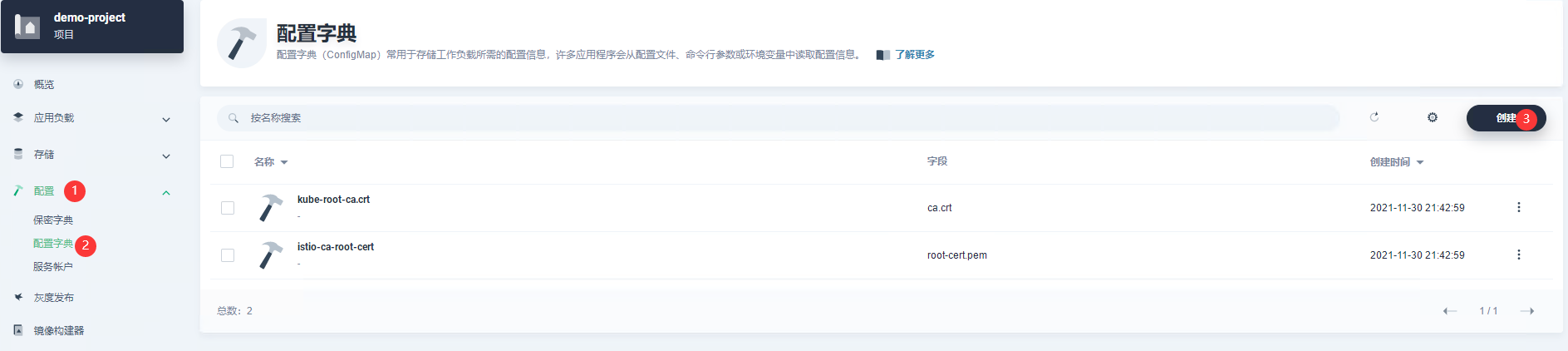
image-20220120105455342 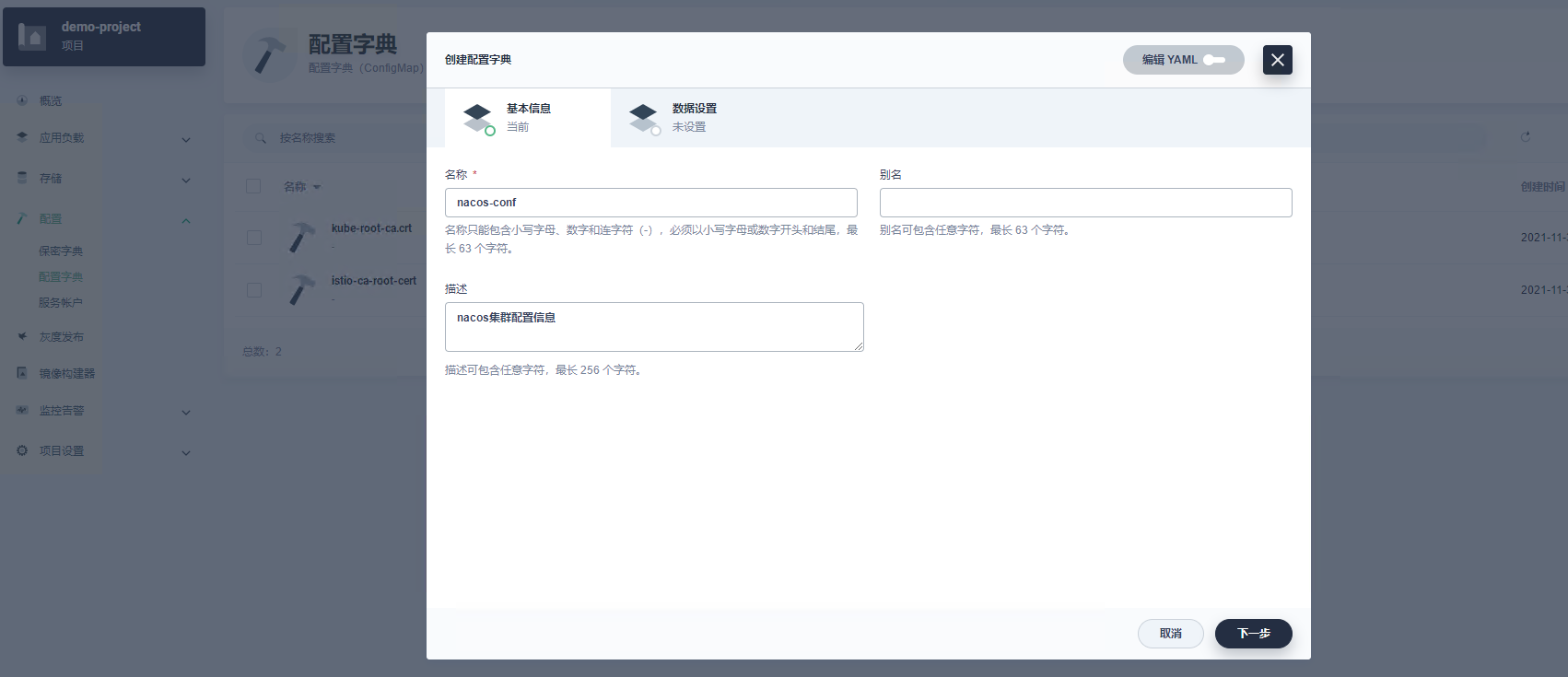
image-20220120105544787 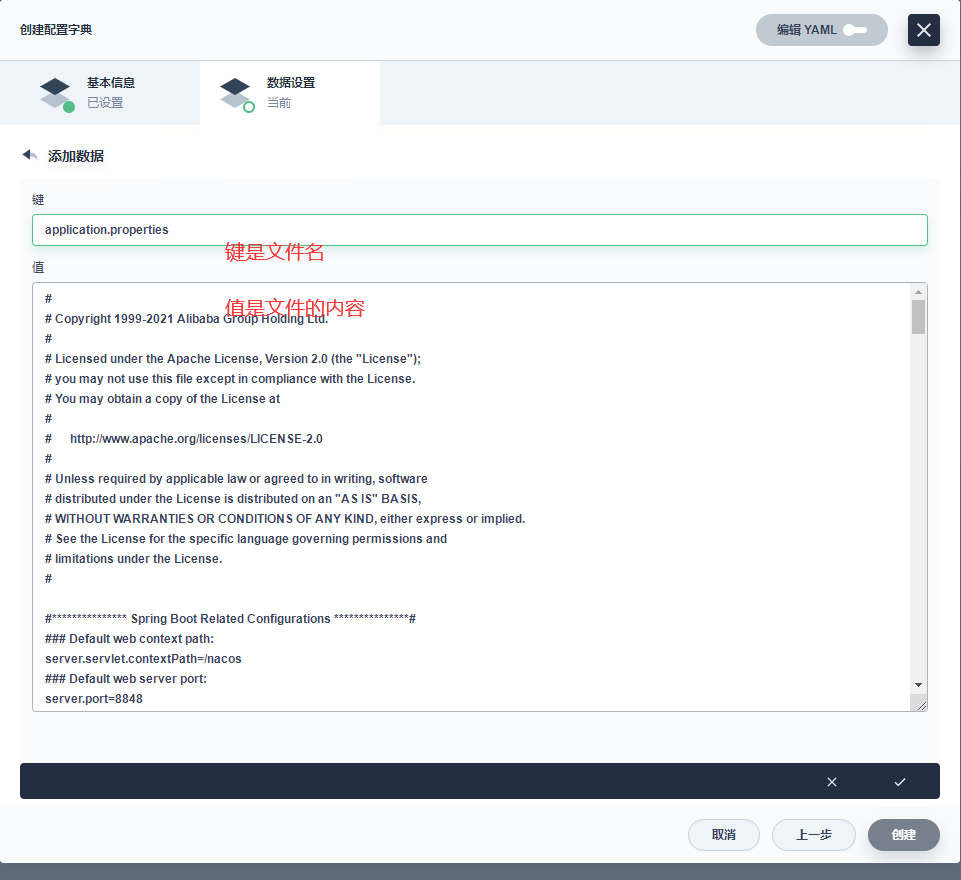
image-20220120110258708 -
添加cluster.conf配置
ip规则是<工作负载-编号>.服务名.项目名.svc.cluster.local
## Copyright 1999-2018 Alibaba Group Holding Ltd.## Licensed under the Apache License, Version 2.0 (the "License");# you may not use this file except in compliance with the License.# You may obtain a copy of the License at## http://www.apache.org/licenses/LICENSE-2.0## Unless required by applicable law or agreed to in writing, software# distributed under the License is distributed on an "AS IS" BASIS,# WITHOUT WARRANTIES OR CONDITIONS OF ANY KIND, either express or implied.# See the License for the specific language governing permissions and# limitations under the License.##it is ip#examplenacos-v1-0.nacos.demo-project.svc.cluster.local:8848nacos-v1-1.nacos.demo-project.svc.cluster.local:8848nacos-v1-2.nacos.demo-project.svc.cluster.local:8848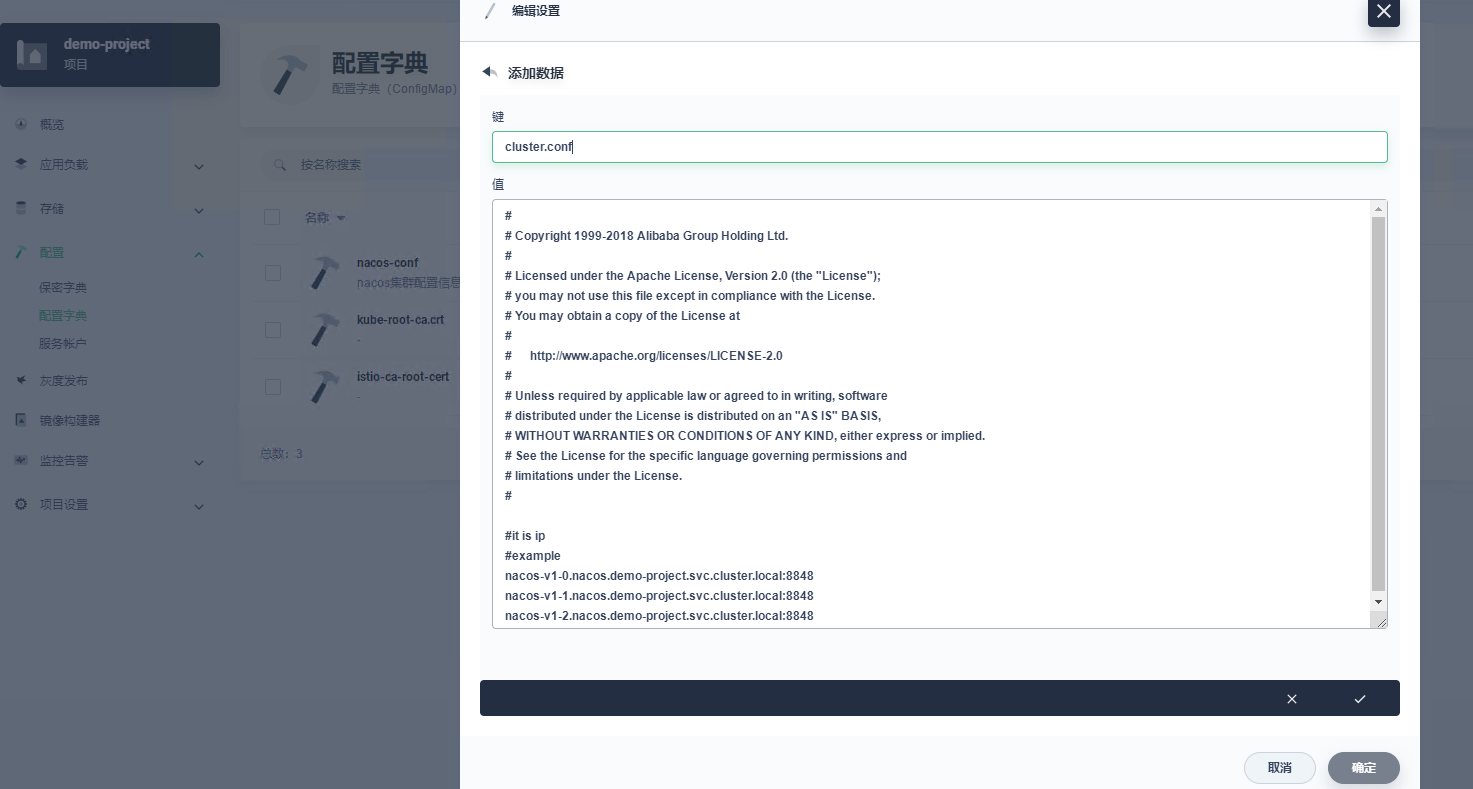
image-20220120112046328 -
创建服务
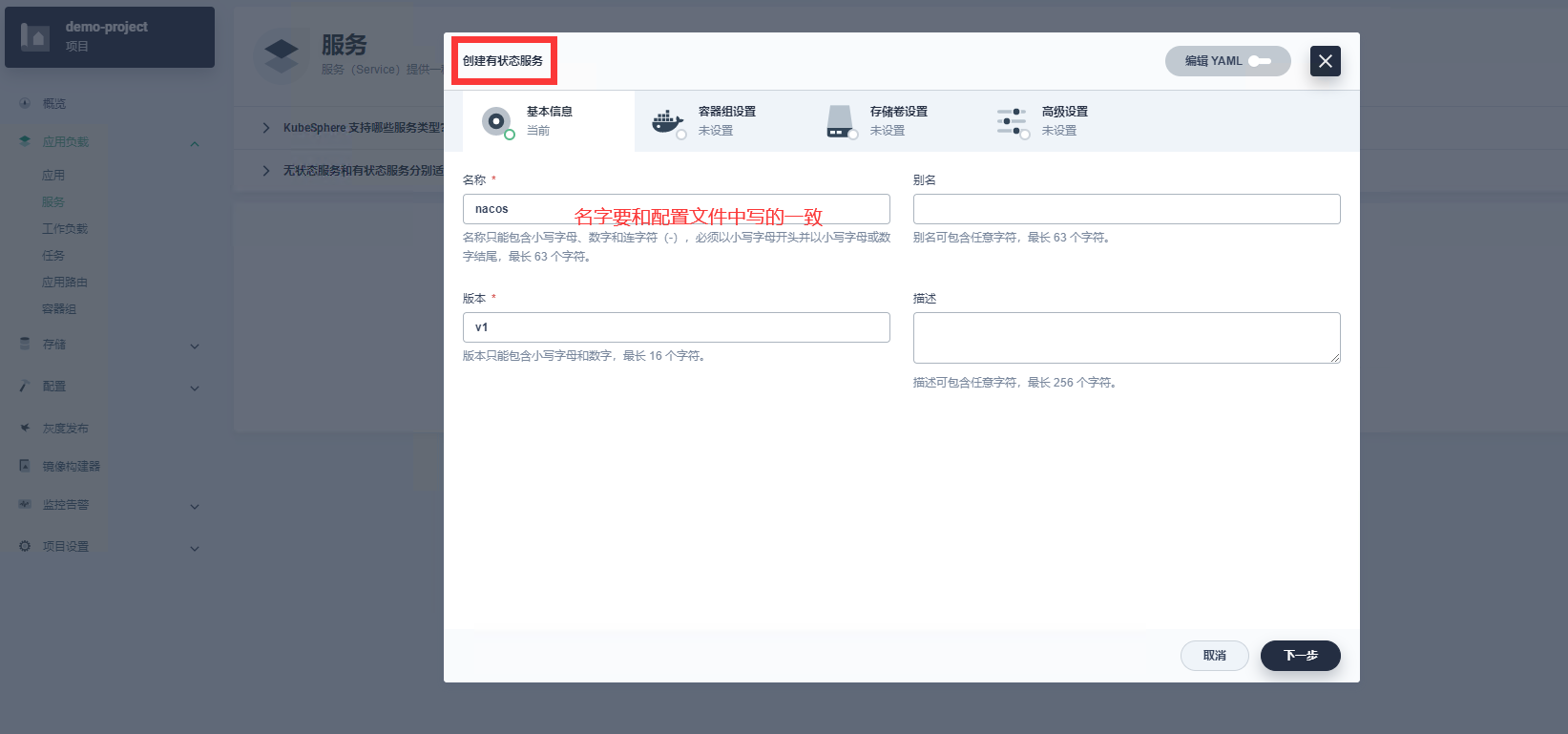
image-20220120112327902 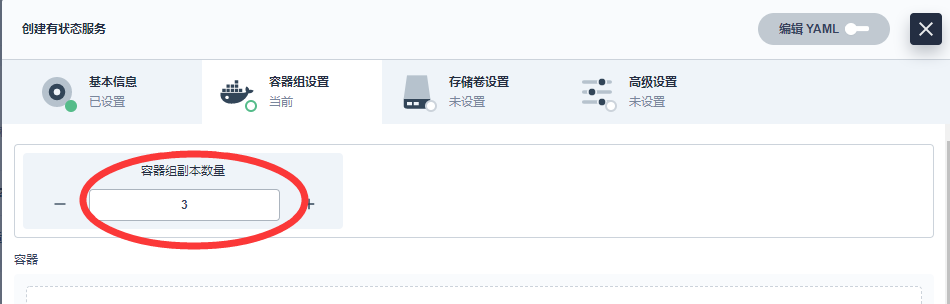
image-20220120132547817 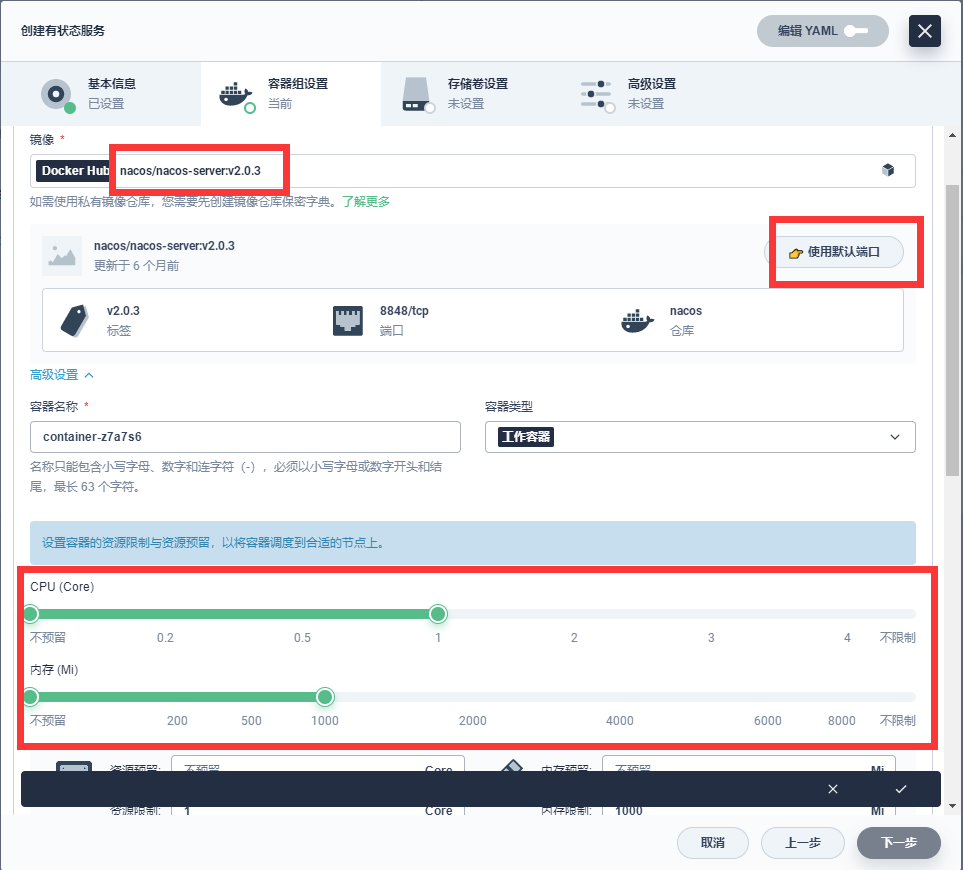
image-20220120132708373 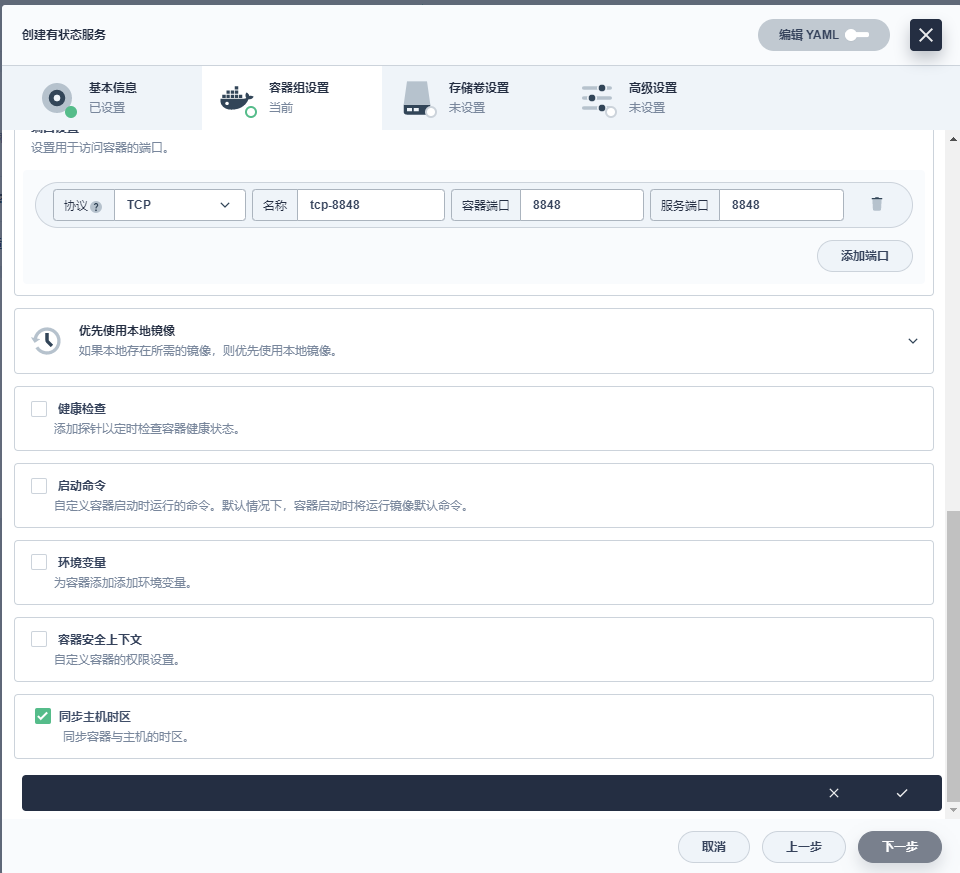
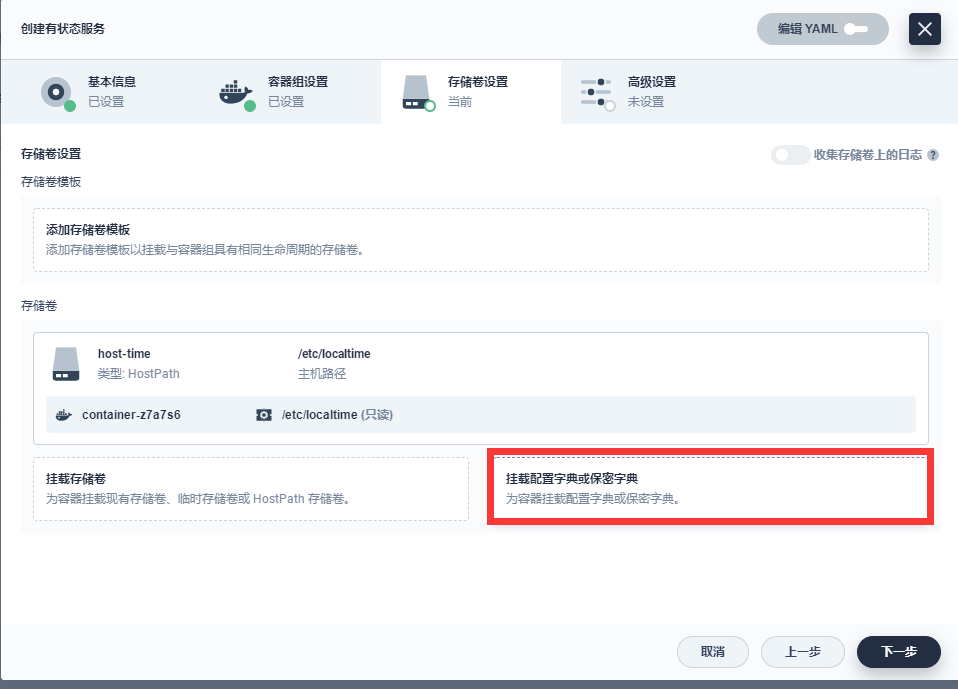
image-20220120133027957 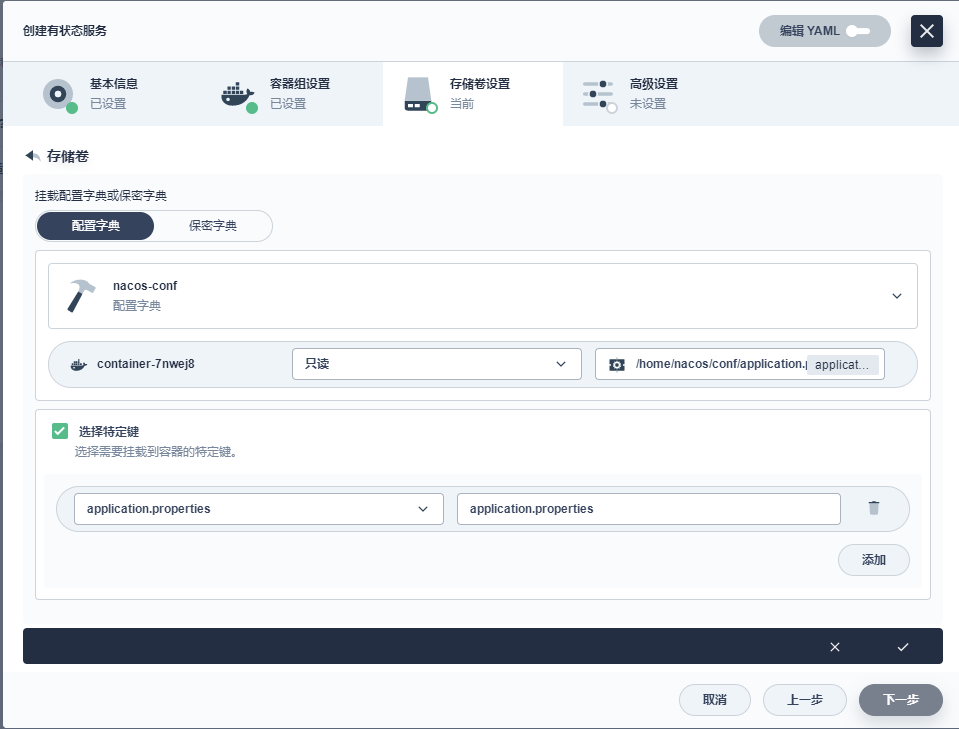
image-20220120133558415 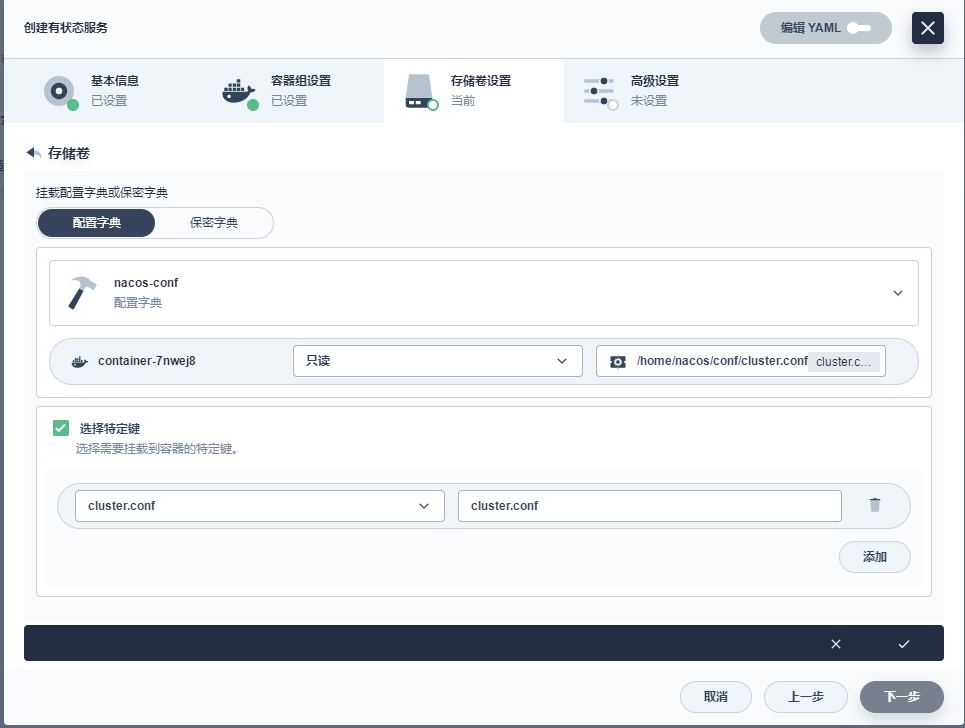
image-20220120133622790 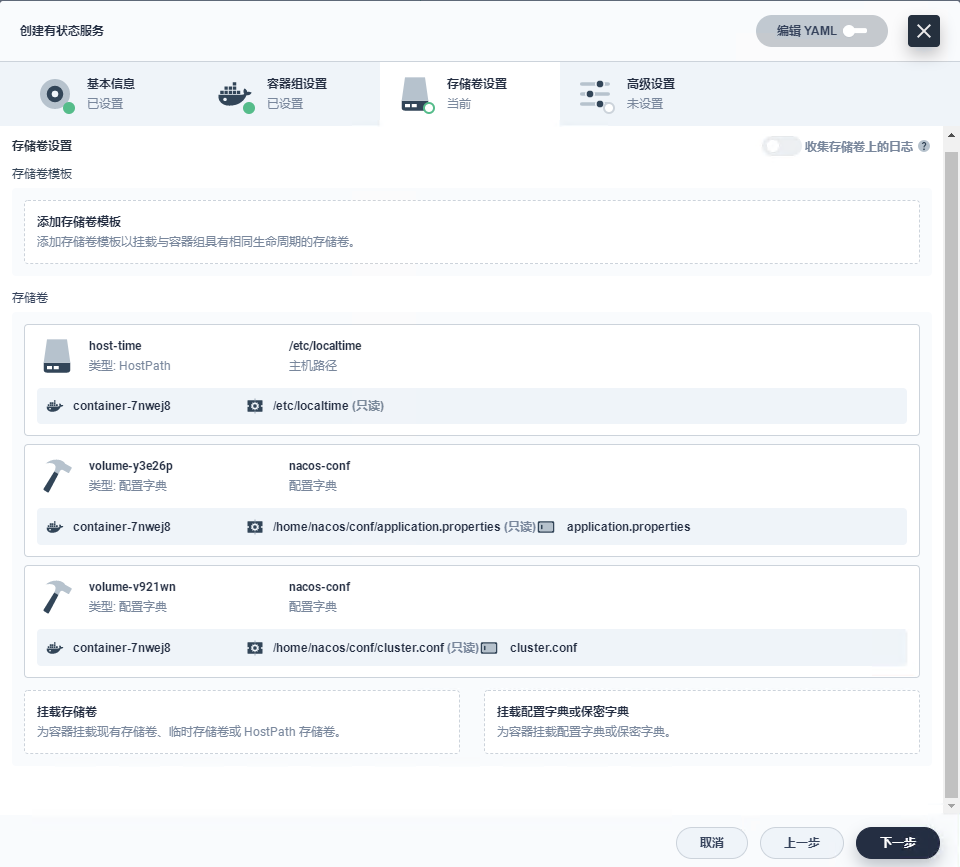
image-20220120133656474 启动效果
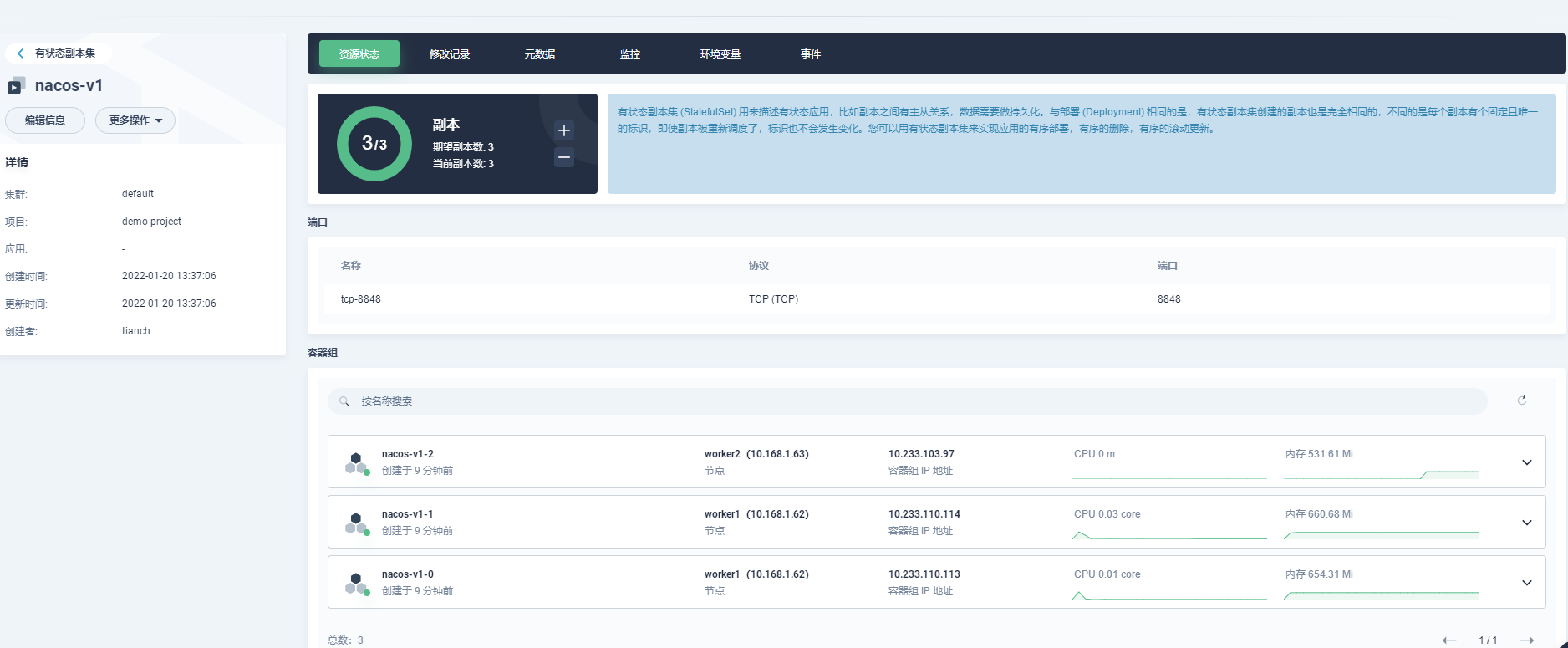
image-20220120134635330 -
暴露外网访问
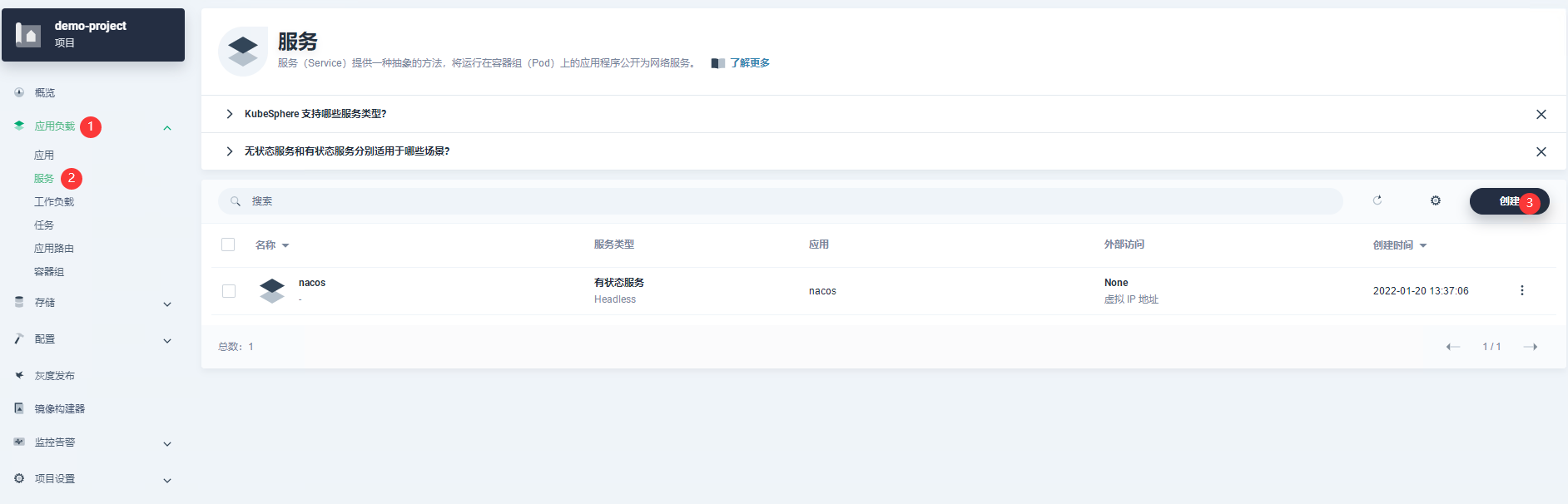
image-20220120134739184 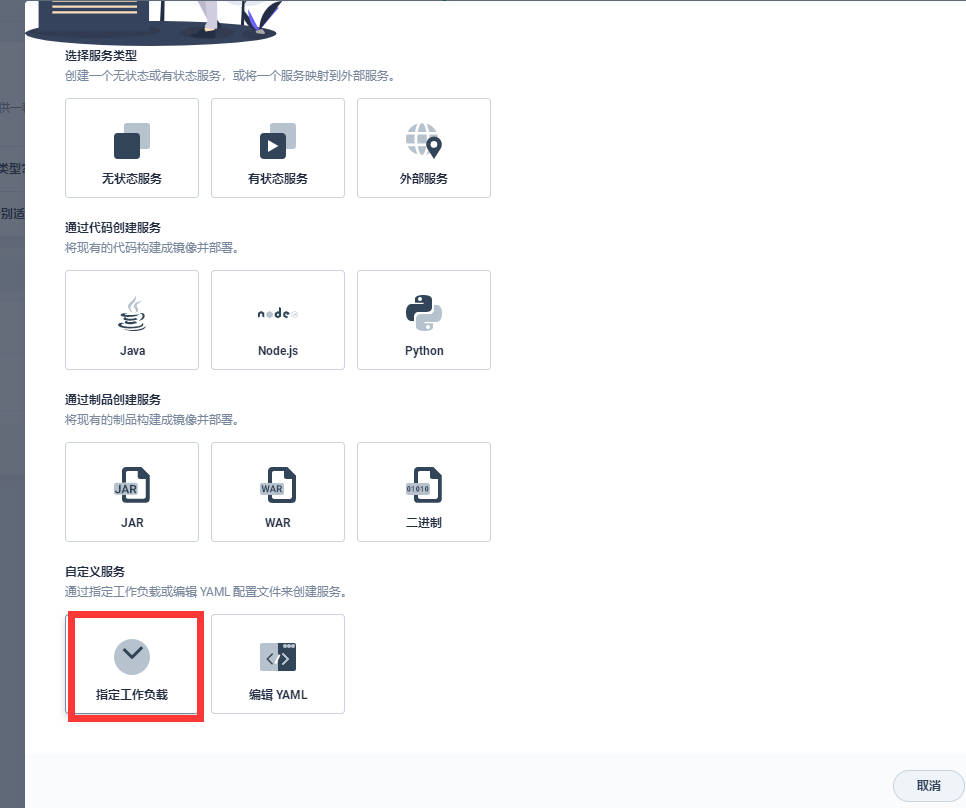
image-20220120134805937 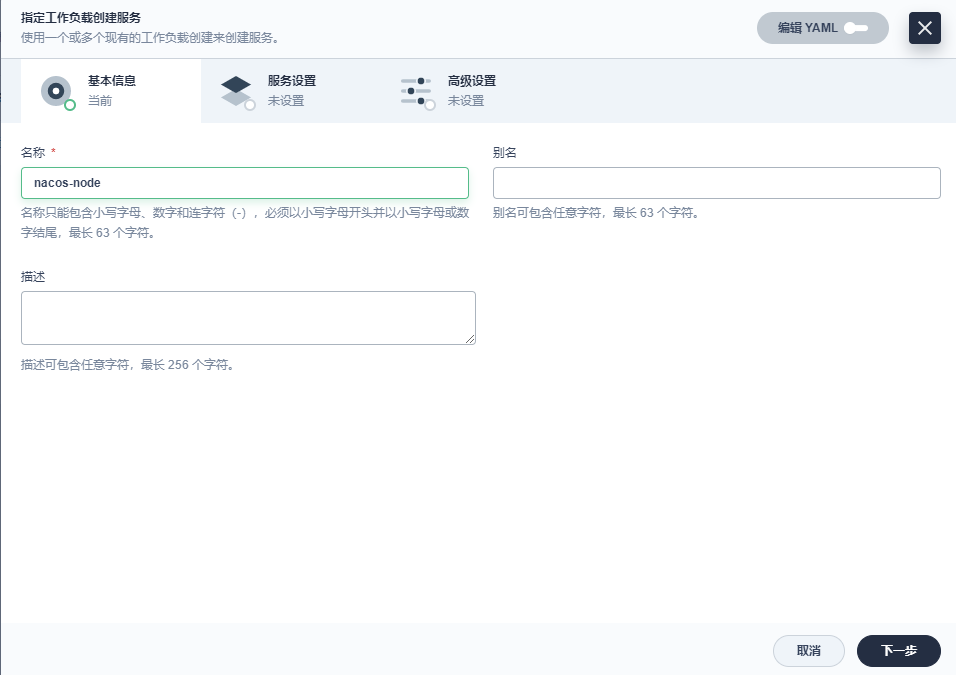
image-20220120134845709 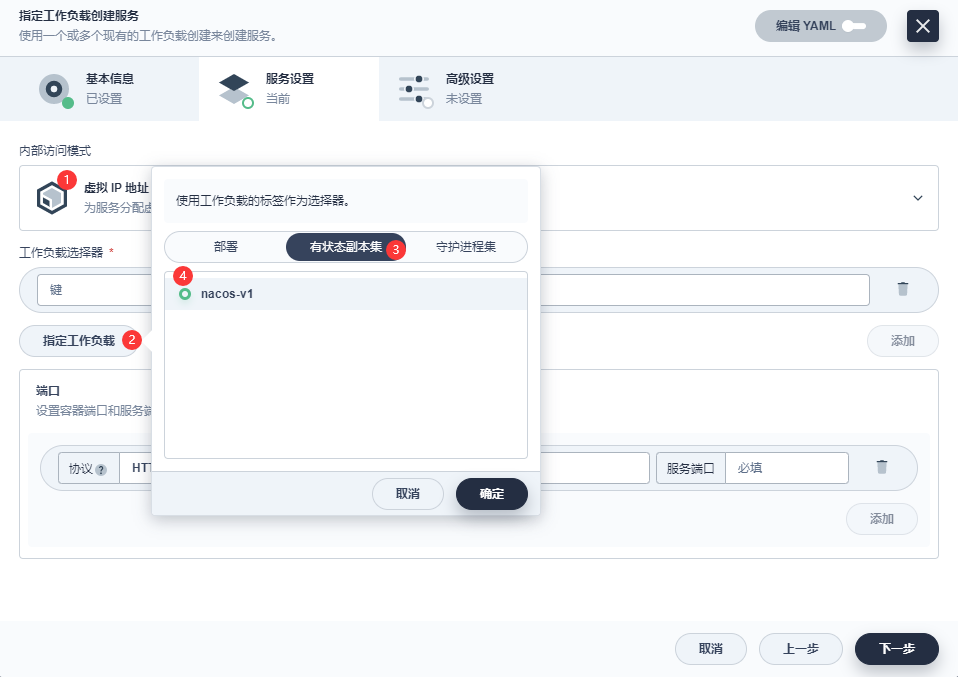
image-20220120134935001 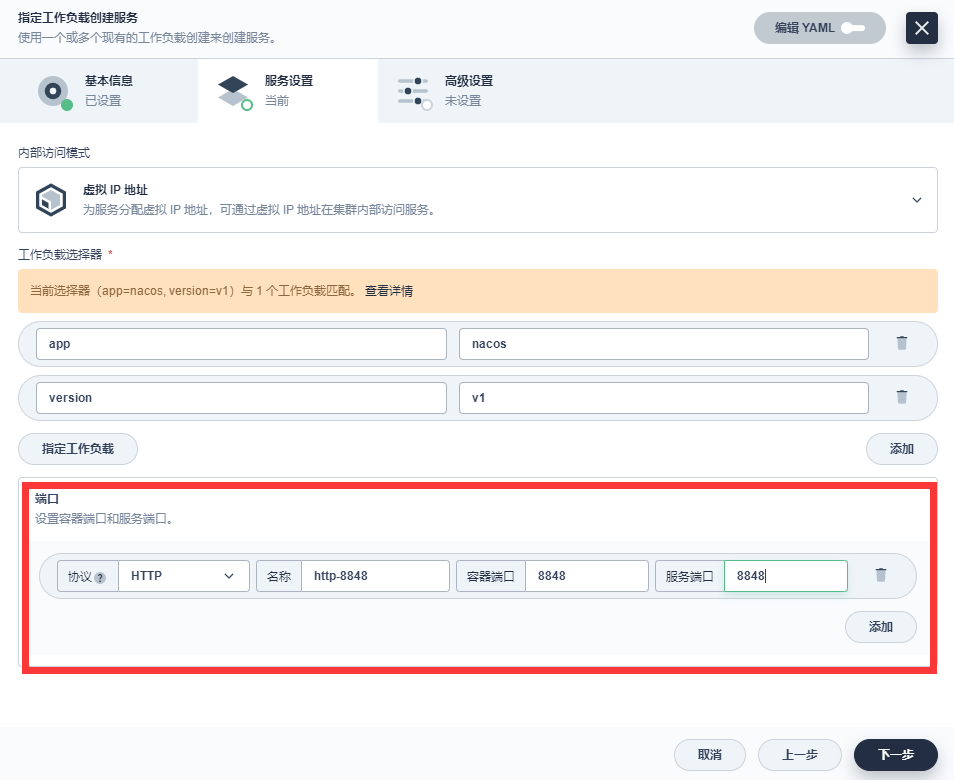
image-20220120135013034 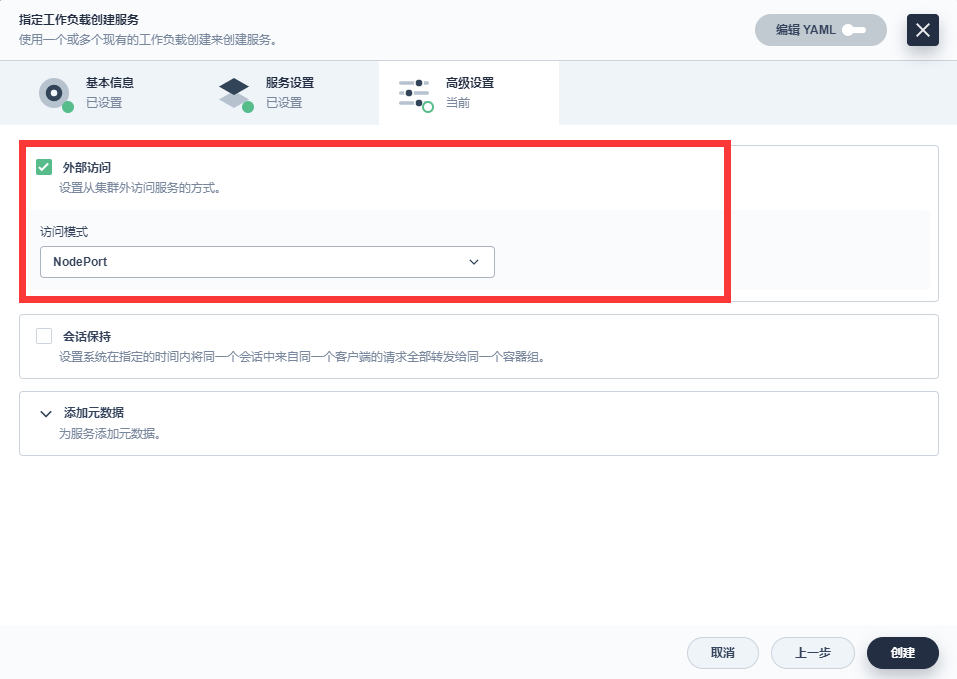
image-20220120135039296 访问效果
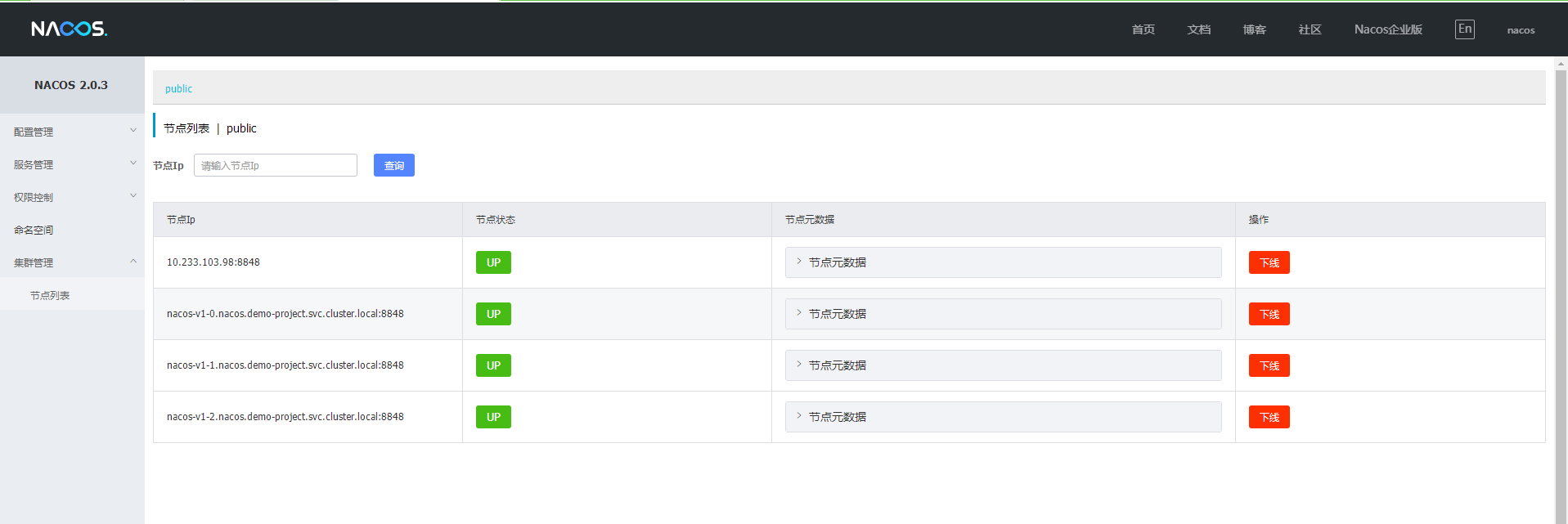
image-20220120140304585
文章分享
如果这篇文章对你有帮助,欢迎分享给更多人!
kubesphere+k8s安装nacos2.0集群版
https://tianch.com.cn/posts/tutorials/kubesphere-k8s-an-zhuang-nacos2-0-ji-qun-ban/文章
115
分类
8
标签
35
总字数
216,150
运行时长
0 天
最后活动
0 天前
站点域名tianch.com.cn
Fireflyv6.15.6
Astrov7.1.3
Nodev22.16.0
pnpmunknown
构建时间2026年8月14日 19:33:59
系统信息Linux / x86_64