


YAML文件格式以及如何编写Kubernetes的YAML类型的资源清单文件
YAML 文件
YAML 是专门用来写配置文件的语言,非常简洁和强大,远比 JSON 格式方便。YAML语言(发音 /ˈjæməl/)的设计目标,就是方便人类读写。它实质上是一种通用的数据串行化格式。
它的基本语法规则如下:
- 大小写敏感
- 使用缩进表示层级关系
- 缩进时不允许使用
Tab键,只允许使用空格 - 缩进的空格数目不重要,只要相同层级的元素左侧对齐即可
#表示注释,从这个字符一直到行尾,都会被解析器忽略
在 Kubernetes 中,只需要了解两种结构类型就行了:
- Maps(字典)
- Lists(列表)
Maps
Map 是字典,就是一个 keyMaps 可以更加方便的去书写配置信息,例如:
---apiVersion: v1kind: Pod第一行的---是分隔符,是可选的,在单一文件中,可用连续三个连字号---区分多个文件。这里可以看到有两个键:kind 和 apiVersion,他们对应的值分别是:v1 和 Pod。上面的 YAML 文件转换成 JSON 格式 如下:
{ "apiVersion": "v1", "kind": "pod"}在创建一个相对复杂一点的 YAML 文件,创建一个 KEY 对应的值不是字符串而是一个 Maps
---apiVersion: v1kind: Podmetadata: name: tianch labels: app: web上面的 YAML 文件,metadata 这个 KEY 对应的值就是一个 Maps ,而且嵌套的 labels 这个 KEY 的值又是一个 Map,可以根据自己的情况进行多层嵌套。
YAML 处理器是根据行缩进来知道内容之间的关联性的。比如我们上面的 YAML 文件,用两个空格作为缩进,空格的数量并不重要,但是得保持一致,并且至少要求一个空格(什么意思?就是别一会缩进两个空格,一会缩进 4 个空格)。可以看到 name 和 labels 是相同级别的缩进,所以 YAML 处理器就知道了它们属于同一个 Map,而 app 是 labels 的值 所以 app 的缩进更大。
!!! warning “注意”
注意:在 YAML 文件中绝对不要使用 tab 键来进行缩进。将上面的 YAML 文件转换成 JSON 文件:
{ "apiVersion": "v1", "kind": "Pod", "metadata": { "name": "tianch", "labels": { "app": "web" } }}Lists
Lists就是列表,说白了就是数组,在 YAML 文件中可以这样定义
args- Cat- Dog- Fish可以有任何数量的项在列表中,每个项的定义以破折号(-)开头的,与父元素之间可以缩进也可以不缩进。对应的 JSON 格式如下:
{ "args": ["Cat", "Dog", "Fish"]}Lists 的子项也可以是 Maps,Maps 的子项也可以是 Lists 如下所示
---apiVersion: v1kind: Podmetadata: name: tianch labels: app: webspec: containers: - name: nginx-demo image: nginx ports: - containerPort: 80 - name: busybox-demo image: busybox ports: - containerPort: 5000上面这个 YAML 文件定义了一个叫 containers 的 List 对象,每个子项都由 name、image、ports 组成,每个 ports 都有一个 key 为 containerPort 的 Map 组成,可以转成如下 JSON 格式文件:
{ "apiVersion": "v1", "kind": "Pod", "metadata": { "name": "tianch", "labels": { "app": "web" } }, "spec": { "containers": [ { "name": "nginx-demo", "image": "nginx", "ports": [ { "containerPort": "80" } ] }, { "name": "busybox-demo", "image": "busybox", "ports": [ { "containerPort": "5000" } ] } ] }}如何编写YAML资源清单文件
最简单的方法就是查找 Kubernetes API 文档,比如我们现在使用的是 v1.22.2 版本的集群,可以通过地址https://kubernetes.io/docs/reference/generated/kubernetes-api/v1.23/查找到对应的 API 文档,在这个文档中我们可以找到所有资源对象的一些字段
比如要了解创建一个 Deployment 资源对象需要哪些字段,我们可以打开上面的 API 文档页面,在左侧侧边栏找到 Deployment v1 apps,就能找到 Deployment 需要提交的 Body 参数
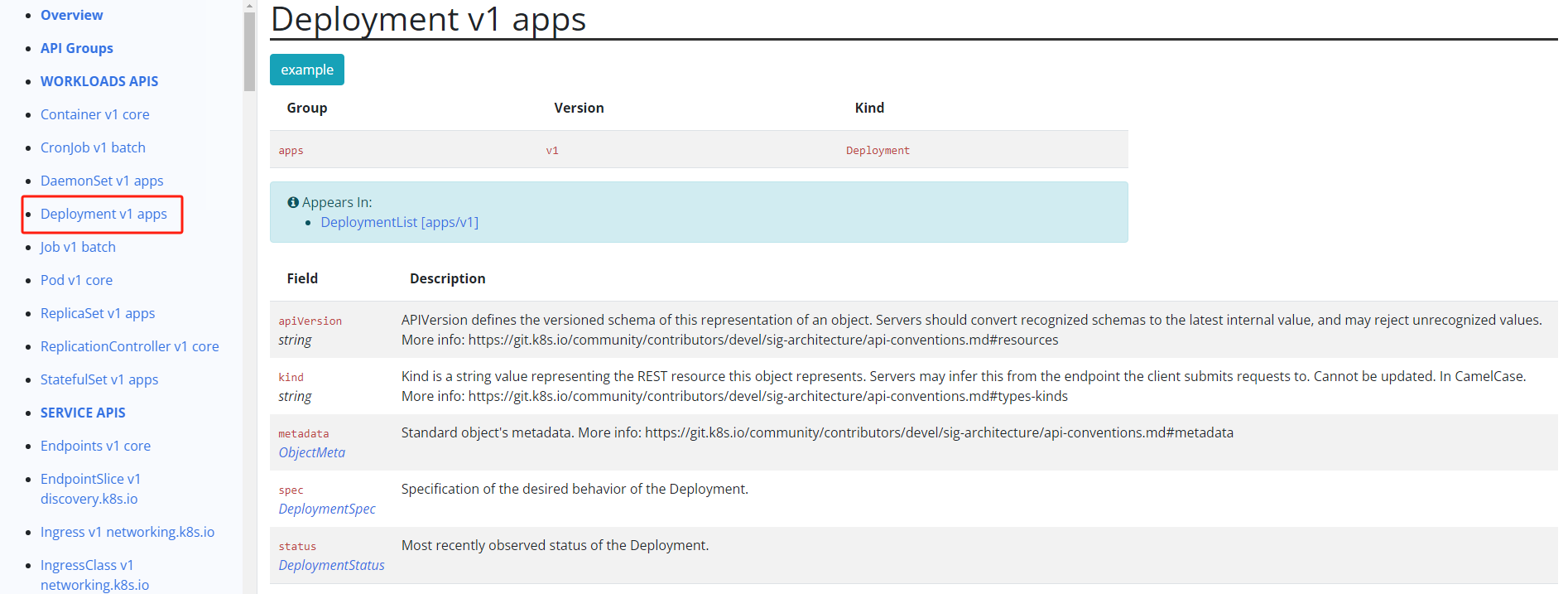
可以看到创建 Deployment 需要的一些字段,比如 apiVersion、kind、metadata、spec 等,而且每个字段都有对应的文档说明,要了解 DeploymentSpec 下面有哪些字段,继续点击进去查看就行
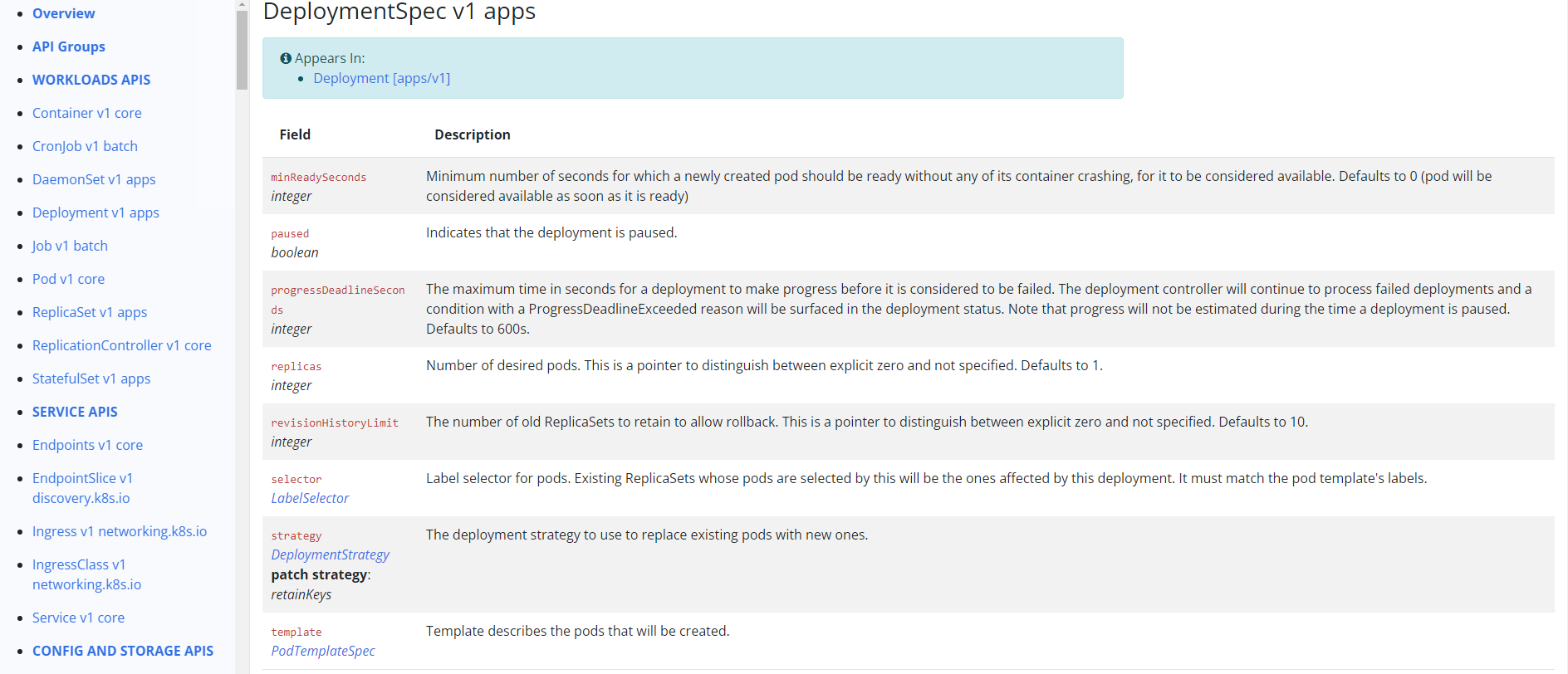
每个字段具体什么含义以及每个字段下面是否还有其他字段都可以这样去追溯。
但是如果平时编写资源清单的时候都这样去查找文档势必会效率低下,Kubernetes 也考虑到了这点,可以直接通过 kubectl 命令行工具来获取这些字段信息,要获取 Deployment 的字段信息,可以通过 kubectl explain 命令来了解
kubectl explain deploymentKIND: DeploymentVERSION: apps/v1
DESCRIPTION: Deployment enables declarative updates for Pods and ReplicaSets.
FIELDS: apiVersion <string> APIVersion defines the versioned schema of this representation of an object. Servers should convert recognized schemas to the latest internal value, and may reject unrecognized values. More info: https://git.k8s.io/community/contributors/devel/sig-architecture/api-conventions.md#resources
kind <string> Kind is a string value representing the REST resource this object represents. Servers may infer this from the endpoint the client submits requests to. Cannot be updated. In CamelCase. More info: https://git.k8s.io/community/contributors/devel/sig-architecture/api-conventions.md#types-kinds
metadata <Object> Standard object's metadata. More info: https://git.k8s.io/community/contributors/devel/sig-architecture/api-conventions.md#metadata
spec <Object> Specification of the desired behavior of the Deployment.
status <Object> Most recently observed status of the Deployment.上面的信息和 API 文档中基本一致,比如其中 spec 字段是一个 <Object> 类型的,证明该字段下面是一个对象,可以继续去查看这个字段下面的详细信息
kubectl explain deployment.specKIND: DeploymentVERSION: apps/v1
RESOURCE: spec <Object>
DESCRIPTION: Specification of the desired behavior of the Deployment.
DeploymentSpec is the specification of the desired behavior of the Deployment.
FIELDS: minReadySeconds <integer> Minimum number of seconds for which a newly created pod should be ready without any of its container crashing, for it to be considered available. Defaults to 0 (pod will be considered available as soon as it is ready)
paused <boolean> Indicates that the deployment is paused.
progressDeadlineSeconds <integer> The maximum time in seconds for a deployment to make progress before it is considered to be failed. The deployment controller will continue to process failed deployments and a condition with a ProgressDeadlineExceeded reason will be surfaced in the deployment status. Note that progress will not be estimated during the time a deployment is paused. Defaults to 600s.
replicas <integer> Number of desired pods. This is a pointer to distinguish between explicit zero and not specified. Defaults to 1.
revisionHistoryLimit <integer> The number of old ReplicaSets to retain to allow rollback. This is a pointer to distinguish between explicit zero and not specified. Defaults to 10.
selector <Object> -required- Label selector for pods. Existing ReplicaSets whose pods are selected by this will be the ones affected by this deployment. It must match the pod template's labels.
strategy <Object> The deployment strategy to use to replace existing pods with new ones.
template <Object> -required- Template describes the pods that will be created.如果一个字段显示的是 required,就证明该字段是必填的,也就是在创建这个资源对象的时候必须声明这个字段,每个字段的类型也都进行了说明,所以有了 kubectl explain 这个命令完全可以写出一个不熟悉的资源对象的清单文件。
文章分享
如果这篇文章对你有帮助,欢迎分享给更多人!